
Free addon
Wingman AI Companion
Last updated 27 November 2026Type /wingman in game, copy the prompt and paste it into an AI app on your PC (the ChatGPT or Claude desktop app, Claude Code, Codex, Gemini CLI): it carries your character, so the answers are for your class, level and gear. Plus /way lines for map pins.
- Version
- 32
- Game
- Retail and WoW: Forever
- With WingHUD
- Installed and updated by WingHUD
In game and in your AI
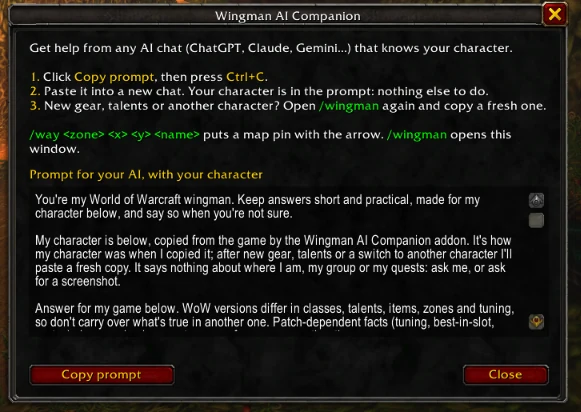
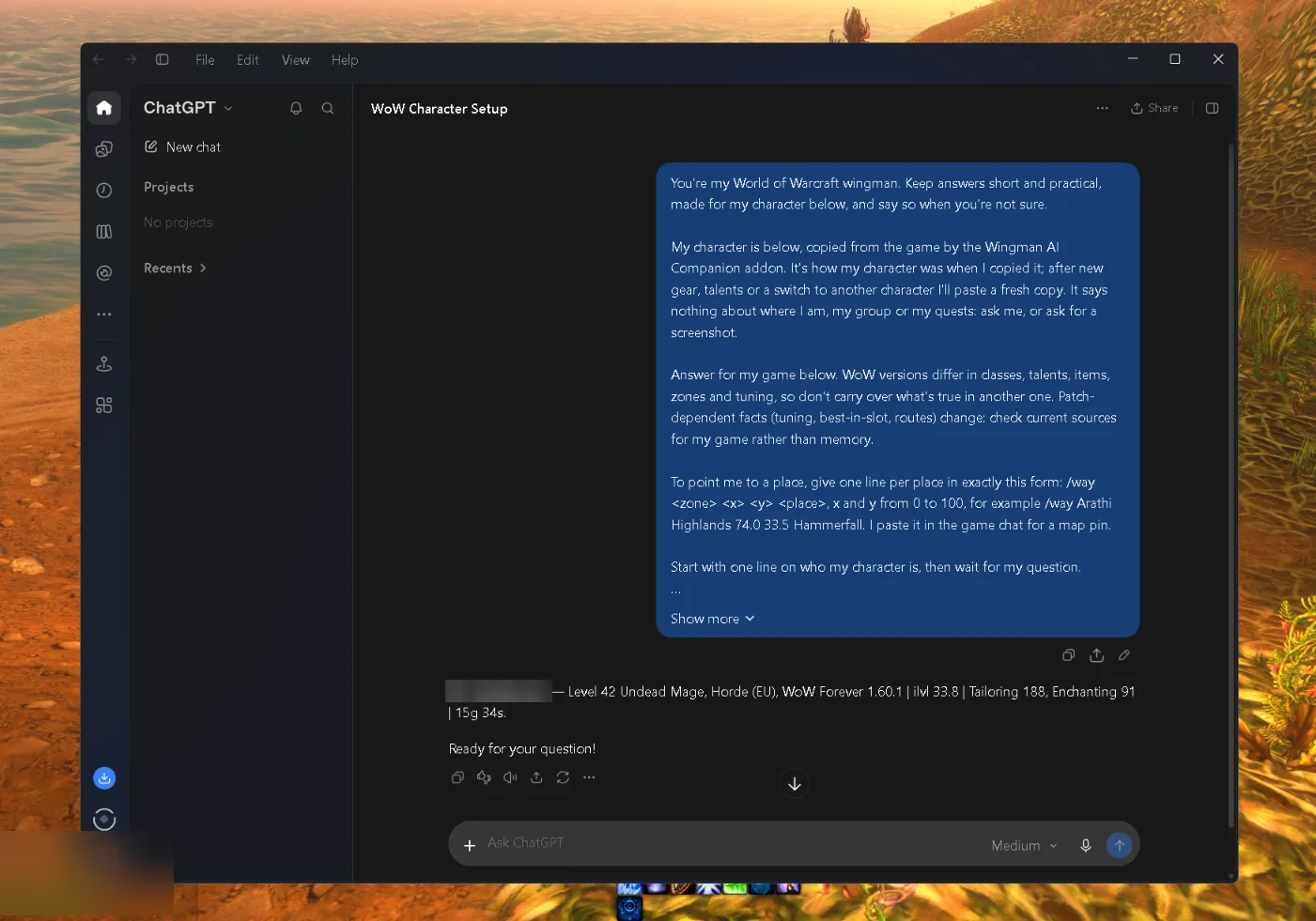
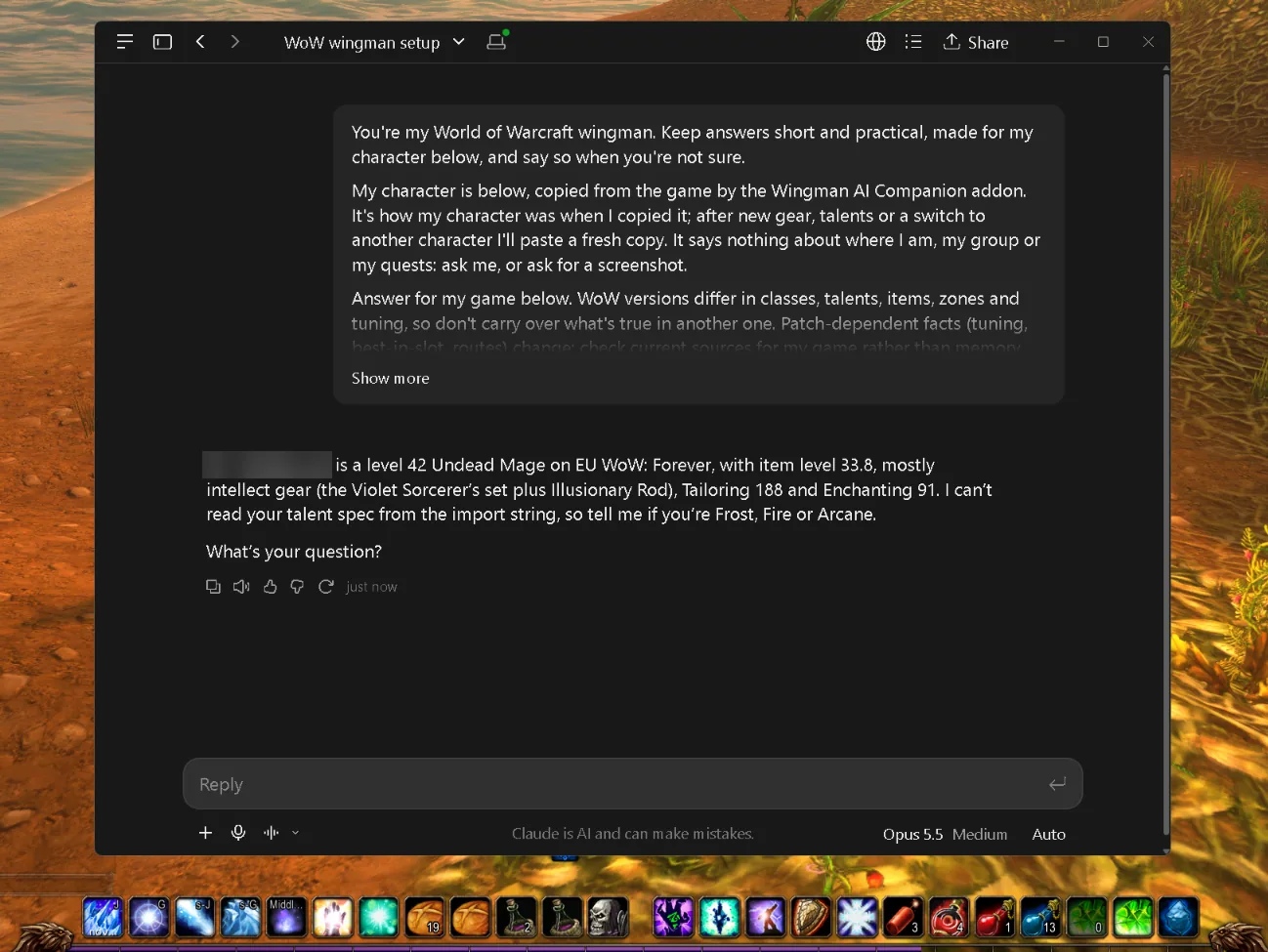
What it does
Type /wingman in the game and copy the prompt. It carries your character, read from the game the moment you open the window: game and version, faction, race, class, level, spec, item level and every piece of gear (stats, Equip and Use effects, enchants, empty sockets), your character sheet (attack and spell power, crit, hit, haste, defense, resistances), the gear in your bags, talents, professions, gold, Mythic+ rating, Great Vault, raid lockouts, renown, PvP rating, currencies, your quest log (objectives and progress), the addons you have loaded and what you did recently. Paste it into an AI app on your PC (the ChatGPT or Claude desktop app, Claude Code, Codex, Gemini CLI) and it answers for your character, not a generic one.
It leaves out where you are and your group: they change by the minute. Tell your AI, or show it a screenshot. A quest's zone in the quest log is where that quest is, not where you are.
It also adds /way <zone> <x> <y> <name>: paste a line like /way Arathi Highlands 74.0 33.5 Hammerfall into the game chat and you get a map pin with the arrow. When TomTom or another addon already owns /way, that addon keeps it and the same lines still work.
The addon never connects to the internet and never sends chat or addon messages.
How to use it
- In the game, type
/wingman. The window also opens by itself the first time you play with the addon. - Click Copy prompt and press Ctrl+C.
- Paste it into a new chat in an AI app on your PC (the ChatGPT or Claude desktop app, Claude Code, Codex, Gemini CLI). That’s it: your character is in the prompt, and the AI starts with one line on who you are.
Changed something? After new gear, a new talent build or a switch to another character, type /reload in the game and your AI is up to date.
Supported: AI apps installed on your PC. Chats in a web browser aren’t supported.
AI apps that read files
The addon also saves your characters to a file on your PC when you /reload, log out or quit: World of Warcraft\_retail_\WTF\Account\<your account>\SavedVariables\WingmanAICompanion.lua (_forever_ for WoW: Forever). An AI app that reads files on your PC, like Claude Code, Codex or Gemini CLI, can read it whenever you ask. Give it this prompt once per chat; it’s also in README.md inside the addon folder.
You're my World of Warcraft wingman. Keep answers short and practical, made for my character, and say so when you're not sure.

My character comes from the Wingman AI Companion addon, in the file WingmanAICompanion.lua. If I attach it, use that. If you can read files on my PC, first ask me which game I play, then read World of Warcraft\<folder>\WTF\Account\<account>\SavedVariables\WingmanAICompanion.lua with that game's folder:
- Retail: _retail_
- Classic (progression realms): _classic_
- Classic Era and Hardcore: _classic_era_
- Anniversary realms: _anniversary_
- WoW: Forever: _forever_
With several account folders, take the newest file. If you have neither the file nor access to it, ask me for it.

How to read it:
- WingmanAICompanionData has one entry per character, keyed "Name-Realm". The one I'm playing has the highest _writtenAtServerTime (Unix seconds), unless I name another; the others are my alts. Each entry's payload is a JSON string with Lua escaping (\" is a quote).
- payload.identity: game (which WoW: Retail, Classic or another version), gameNote (read it first when present), gameVersion, name, realm, region, faction, class, race, level, spec, itemLevel, gear (slot, name, itemLevel, stats, dps for a weapon, effects = the item's green tooltip lines: Equip, Use, Chance on hit, set bonuses, enchant; hasEnchant, emptySockets).
- payload.weekly: mythicPlusRating, talentString (talent import string), raidLockouts, professions, gold (copper: 10,000 = 1 gold), renown, pvpRating, vault, currencies. payload.journal: recent events with Unix times.
- payload.quests: count (quests in my log) and list: id, title, level, zone (the quest log header it sits under: where the quest is, not where I am), complete (ready to turn in), failed, group (suggested group size), tracked, followed (the one my map arrow follows), objectives (text with counts, done). payload.addons: the addons I have loaded (name, title, version).
- payload.characterStats: the character sheet when the file was written (health, mana, primary stats, attackPower, weapon damage and speed, meleeCrit / meleeHit / spellCrit / spellHit / haste and other values in %, spellDamage, healing, defense, armor, dodge / parry / block, resistances, mastery and versatility on Retail, form = a shapeshift form, buffs = the buffs counted in).
- payload.bags: slots and free; gear = each piece of gear in my bags (name, quality, itemLevel, slot, type, requiredLevel, stats, dps, effects, cantUse = red tooltip lines: a requirement I don't meet); other = everything else by name with count; junk = grey items (count, value in copper). The bank isn't included.
- Missing or null means unknown: don't guess it. Ignore WingmanAICompanionSettings.

Answer for the game in identity.game. WoW versions differ in classes, talents, items, zones and tuning, so don't carry over what's true in another one.

The /reload rule: the game writes this file only when I type /reload, log out or quit, so it shows my character as of then. When my question depends on something that may have changed since (new gear, talents, quest progress, another character), say how old the file is and ask me to /reload and send it again; for my quests or bags, do that whenever the file is more than an hour old, and still answer from the quests in it. It has nothing on where I am or my group (an older file may list a zone: ignore it). Ask me, or ask for a screenshot.

Patch-dependent facts (tuning, best-in-slot, routes) change: check current sources for my game rather than memory.

To point me to a place, give one line per place in exactly this form: /way <zone> <x> <y> <place>, x and y from 0 to 100, for example /way Arathi Highlands 74.0 33.5 Hammerfall. I paste it in the game chat for a map pin.

Now tell me in one line who my character is (name, game, level, race, class, spec), then wait for my question.
Commands
/wingman | Opens the window with the prompt to copy: your character, ready for any AI. |
/way <zone> <x> <y> <name> | A map pin with the arrow, for example /way Arathi Highlands 74.0 33.5 Hammerfall. Coordinates go from 0 to 100. |
/reload | Saves the file for AI apps that read files (the /wingman prompt is always current). |
Install
With WingHUD: WingHUD installs it when World of Warcraft starts and keeps it up to date; type /reload when it tells you a new version is in.
By hand:
- Download WingmanAICompanion.zip.
- Unzip it into your game’s AddOns folder, so you get
Interface\AddOns\WingmanAICompanion\:World of Warcraft\_retail_\Interface\AddOns\for Retail,_forever_for WoW: Forever. - Restart the game, or type
/reload.
An addon installed by hand doesn’t update itself: the latest version is always here.
Frequently asked
Do I need WingHUD?
No. Install the addon, type /wingman and paste the prompt into the AI app on your PC. With WingHUD, it's installed and kept up to date for you, and WingHUD knows your character without any pasting.
Which AI apps are supported?
AI apps installed on your PC: the ChatGPT or Claude desktop app, Claude Code, Codex, Gemini CLI and the like. Chats in a web browser aren't supported.
Is it safe?
It uses only the game's addon API, like any addon from CurseForge. It never connects to the internet, and nothing leaves your PC unless you paste it somewhere.
My AI talks about old gear.
The prompt is a copy from the moment you made it. Open /wingman again and paste a fresh one.
WingHUD in WoW
What the wingman does for World of Warcraft players: talents, gear, dungeons, map pins and the rest.
Manual download
The addon on its own, version 32. Installed by hand, it doesn’t update itself: the latest version is always here.